But "online booking" means different things depending on how it's set up. A basic reservation form and a true instant rental that collects payment and locks in a unit are not the same thing — and many operators configure one while expecting the other.
This guide covers exactly what's required to enable instant online bookings: the software, the payment setup, the configuration steps, and the common mistakes that cause a promising setup to underperform.
Key Takeaways
- Instant online bookings require self-storage management software with a dedicated online rental module.
- Payment processing must be active before a "Rent Now" option appears to customers.
- Reservations hold a unit without payment; instant rentals require payment upfront to secure the unit.
- Real-time inventory sync and mobile optimization are both required for bookings to work without friction.
- Third-party platforms like SpareFoot expand your reach beyond your own website.
How to Enable Instant Online Bookings: Step-by-Step
Step 1: Choose Management Software With an Online Rental Module
Online bookings are powered entirely by the facility management software. No matter how well-designed your website is, instant rentals are impossible without a platform that supports them.
What to look for in your software:
- Real-time unit availability display that reflects actual inventory
- Integrated payment processing (not a separate bolt-on)
- Digital lease signing (e-signature capability)
- A configurable rental widget or API (embed code) that connects to your website
Several platforms have confirmed full online rental capability: SiteLink, Storage Commander, Storable Easy, and Tenant Inc./Hummingbird all support unit selection, payment, and digital lease workflows. Bear Cave Storage in Stewartville, Minnesota, for example, runs on Storable Easy, which powers their "Rent Now" and "Reserve Now" options across all unit types directly on the website.
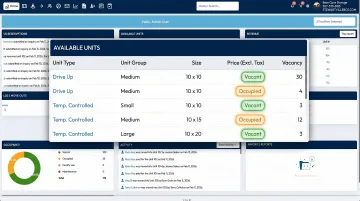
Before committing to a platform, confirm whether the software supports full online move-ins (unit selection + payment + e-lease, zero manager involvement) or only reservations and partial workflows. Ask vendors directly — the difference matters.
Step 2: Set Up and Activate a Payment Processor
Even when software is fully configured, the "Rent Now" button won't display to customers until a payment gateway is connected and active. Many operators don't discover this until their setup is otherwise complete.
What this step involves:
- Sign up with a payment processor compatible with your management software
- Connect the processor to your software account (usually through an API key or integration dashboard)
- Run test transactions end-to-end before going live
On the compliance side: any facility accepting card payments online needs a PCI-DSS compliant payment setup. For small operators, PCI SSC's guidance for small merchants explains that validation typically happens through a Self-Assessment Questionnaire — meaning you don't need a third-party audit to get started, but you do need to confirm your setup meets baseline requirements.
Payment methods to accept at minimum:
- Credit and debit cards (expected by all renters)
- ACH/bank transfer (useful for long-term tenants on autopay)
- Digital wallets like Apple Pay or Google Pay (supported by platforms like Storage Commander and Tenant Inc.)
Step 3: Configure Your Online Rental Settings
Once your software and payment processor are connected, configuration determines what customers can actually do online.
Navigate to the website or rental settings section of your management software and work through these decisions:
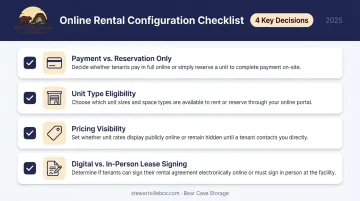
- Decide whether customers can pay and complete a rental online, or only hold a unit with a reservation
- Choose which unit types are bookable online — some operators restrict large or specialty units to in-person rental
- Confirm that pricing is visible before checkout, not hidden behind a form submission
- Determine whether customers can sign the lease digitally or must sign in person
For operators in Minnesota, Minnesota Statutes Chapter 325L (the state's Uniform Electronic Transactions Act) confirms that a record or signature cannot be denied legal effect solely because it's electronic — meaning e-leases are legally valid when UETA consent requirements are met.
Have your digital lease reviewed by an attorney familiar with Minnesota storage law before going live.
Before you launch: test the entire rental flow from the customer's perspective on both desktop and mobile. Broken confirmation emails, missing payment steps, and confusing unit-selection screens are nearly always caught here — not during admin-side setup.
Step 4: Publish and Promote Your Booking Capability
Getting the rental flow live is only half the job — customers need a clear path to find and use it.
On your own website:
- Place a prominent "Rent a Unit Online" call-to-action on the homepage and unit listings page
- Link directly to the rental module, not a general "Contact Us" page
- Make the path from homepage to completed rental as short as possible
On third-party platforms: SpareFoot's operator marketplace supports free listings for independent operators and can integrate with management software to keep inventory and pricing current. StorageCafe and Storage.com serve similar purposes on the consumer side. For a facility like Bear Cave Storage — which draws renters from Stewartville, Rochester, Byron, Racine, and Pine Island — aggregator listings extend visibility across a wider geographic area than a single website can cover alone.
On Google: Update your Google Business Profile with accurate hours and a direct link to your booking page. Google's Business Profile platform supports booking links, and local search traffic is often the highest-intent traffic a facility receives.
Instant Rentals vs. Reservations: Which Does Your Facility Need?
These two options serve different operational goals. Choosing the wrong one adds admin work instead of reducing it.
| Online Reservation | Instant Online Rental | |
|---|---|---|
| Payment collected | No | Yes |
| Unit secured | No (hold only) | Yes, immediately |
| Follow-up required | Yes | No |
| Manager involvement | Required to confirm | None required |
| Best for | New facilities, vetting tenants | Remote ops, limited hours |
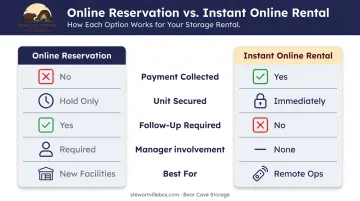
The table outlines the tradeoffs — here's how to apply them to your operation.
Reservations make more sense when:
- You're leasing up a new facility before opening
- You want to verify tenant information in person before finalizing
- Your market has uncertain demand and follow-up calls convert well
Instant rentals work better when:
- Your facility operates remotely or with limited office hours
- Customers are relocating from out of town and can't visit in person
- You want to reduce the time staff spend on intake processing
Most established independent operators benefit more from instant rentals. If a customer can rent a unit at midnight without calling anyone, you've eliminated one of the biggest drop-off points in the signup process.
What You Need Before Going Live
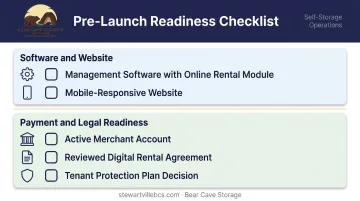
Before your online rental flow goes live, these are the pieces that need to be in place. Gaps in any of them will either break the system outright or erode customer confidence before someone completes a booking.
Software and Website Requirements
- Management software with an online rental module — not all platforms include this at the base pricing tier. Confirm the feature is part of your plan before building anything around it.
- Mobile-responsive website — more than 60% of self-storage searches now happen on mobile, per Inside Self-Storage's 2025 reporting. A desktop-only experience loses those visitors before they reach checkout.
Payment and Legal Readiness
- Active merchant account — fully set up and tested, not just applied for. Expect to provide a business bank account, EIN, and identity verification through your payment processor.
- Reviewed digital rental agreement — an e-lease unchecked against state law creates real exposure around lien rights, insurance terms, and liability. In Minnesota specifically, that review should address storage-specific statutes and Chapter 325L's e-signature provisions.
- Tenant protection plan decision — determine upfront whether coverage will be offered, optional, or required at checkout. Most platforms let you configure this directly in the checkout flow, which adds a recurring revenue stream without adding friction for the renter.
Key Factors That Determine Whether Online Bookings Convert
Once bookings are technically enabled, the quality of the setup determines how many visitors actually complete a rental.
Real-Time Unit Availability
If the units shown online don't reflect actual inventory, customers will attempt to book already-rented spaces. That leads to failed transactions, frustrated customers, and the kind of negative reviews that are hard to recover from. Your management software must update availability automatically as units are rented or vacated — no manual refresh process in between.
Pricing Transparency
Renters expect to see prices before they start a rental. Facilities that hide pricing or require a phone call to get rates lose customers to competitors who display it clearly. Inside Self-Storage's 2025 analysis found that transparent pricing during the consideration stage directly influences a renter's final facility choice — facilities that bury rates see higher drop-off before a rental ever starts.
Checkout Simplicity
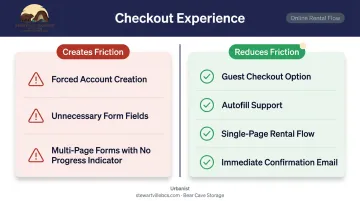
A long or confusing checkout process loses rentals. Baymard's 2025 research found a 70.19% average cart abandonment rate across e-commerce, with forced account creation, trust concerns around card entry, and long forms as the top causes. Those same friction points show up in self-storage rental flows.
What creates friction:
- Requiring account creation before checkout
- Asking for information that isn't needed to complete the rental
- Multi-page forms with no progress indicator
What reduces it:
- Guest checkout option
- Autofill support
- Single-page or minimal-step rental flow
- Immediate confirmation email after payment
Mobile Optimization
More than half of self-storage website traffic comes from mobile. A rental flow that works on desktop but breaks on a phone will lose a meaningful share of potential tenants before they ever complete a booking.
Before going live, test every step on an actual mobile device:
- Unit selection
- Payment entry
- Lease review
- Confirmation screen
Common Mistakes When Setting Up Online Bookings
Three mistakes consistently derail online booking setups before a single unit gets rented:
Mistaking a reservation form for a booking system. A "Reserve Now" form doesn't secure a unit — it just generates a lead that requires a manual follow-up call to convert. Without payment confirmation, occupancy doesn't move. If the goal is reducing manual work and filling units faster, reservations alone won't get you there.
Never testing the process as a customer. Most operators configure the system from the admin side and never run through what a renter actually experiences. Missing confirmation emails, broken payment screens, and confusing lease steps only surface when someone completes the full flow on a mobile device.
Letting pricing and availability go stale. Outdated pricing — whether in the software or on the listing page — creates a mismatch between what customers see and what they're charged. That gap generates complaints, chargebacks, and lost trust.
Frequently Asked Questions
Frequently Asked Questions
How do you fully automate a self-storage facility?
Full automation combines online rentals (payment + e-lease), smart access control (keypad or mobile entry), automated billing, and remote monitoring. With this stack in place, routine transactions (move-ins, payments, move-outs) require no on-site staff involvement. Many independent operators run fully unattended facilities successfully using exactly this model.
What's the difference between an online reservation and an online rental for self-storage?
A reservation holds a unit with no payment and is not guaranteed. An online rental collects payment (and often an e-signature) at checkout, securing the unit immediately. The two look similar in the admin interface, so confirm which your software actually provides before configuring.
Do I need special software to accept online storage bookings?
Yes. A self-storage management platform with an online rental module is required. Standard website builders or basic contact forms can't process payments, sync inventory in real time, or generate digital leases. Platforms like Storable Easy, SiteLink, and Storage Commander are purpose-built for this.
Can customers sign a lease and complete the entire rental process online?
Yes, if the management software supports digital lease signing and ID verification. This is called an "online move-in" — customers handle unit selection, payment, and lease execution without visiting the office. Verify this feature is included in your specific software tier before launch.
What payment methods should I accept for online storage bookings?
Credit and debit cards are the minimum requirement. ACH/bank transfer is a useful addition for long-term tenants on autopay. Some platforms also support Apple Pay and Google Pay. The options available depend on what your integrated payment processor supports.
How do I make sure my storage facility appears on online booking platforms?
Submit your facility to SpareFoot and Storage.com directly — SpareFoot offers free listings for independent operators and supports software integrations to keep inventory current. Also update your Google Business Profile with accurate hours and a direct link to your booking page to capture local search traffic.